Before It's Too Late
Everglades Safari AR
On-site AR safari at Losner Park — visitors discover Everglades and Biscayne Bay species, feed and dance with them, and collect a Biodex.
Project brief
Designed the visitor-facing mobile experience for Everglades Safari AR, a free education app for Losner Park in Homestead, Florida. The work sat with Before It's Too Late (BITL) — a Miami nonprofit arts collective — in collaboration with The Everglades Foundation, sponsored by the City of Homestead. The safari lives in downtown Homestead, the Gateway to Everglades and Biscayne National Parks, so families can meet the ecosystem without first traveling into the park.
Problem to address
Climate change feels far away for many people, and visitors who want to learn about the Everglades often are not sure how to start. Downtown Homestead needed a public, on-site way to bring species and habitats to a city park — and to inspire future stewards — without requiring a trip into the national park first.
Goals
- Teach species that matter to the Everglades and Biscayne Bay ecosystems
- Let visitors discover and interact with 3D plants and animals through the phone camera
- Turn learning into play — feed, dance, and collect species in a Biodex
- Reward a completed safari with a 3D-printed sculpture at the Cybrarium
User journeys
Discover a species at Losner Park
The visitor loop from arriving in downtown Homestead to collecting a species — and, if they finish the Biodex, a sculpture at the Cybrarium.
Arrive at the park
Unsure
- Goal
- Find a way to learn about the Everglades in town.
- Action
- Comes to Losner Park in downtown Homestead, often with family.
- Opportunity
- The safari starts in the park they already know how to reach.
Scan the memorial
Curious
- Goal
- Wake the experience on the phone.
- Action
- Points the camera at the World War II memorial marker.
- Opportunity
- A single scan at a landmark is a clearer start than a hidden menu.
Meet the guide
Welcomed
- Goal
- Understand why this site matters before the animals appear.
- Action
- A holographic guide appears in virtual glass and frames the safari.
- Opportunity
- History first gives the wildlife walk a reason to exist here.
Follow the wildlife map
Exploratory
- Goal
- Find the next species in the park.
- Action
- Uses the mini-map and glowing points to walk between themed zones.
- Opportunity
- Hidden animals as map points turn the park into a hunt, not a list.
Encounter a species
Delighted
- Goal
- See a plant or animal in the real scene.
- Action
- Scans a zone marker; a 3D species appears on the grass through the camera.
- Opportunity
- Grounded AR keeps the lesson in the park, not in a 3D viewer.
Read the overlay
Focused
- Goal
- Learn what this species is and why it matters.
- Action
- Reads name, status, and size, then taps yellow icons for diet, habitat, and health.
- Opportunity
- Short facts on tap beat a long article while standing outside.
Play with the species
Playful
- Goal
- Do something with the animal, not only look at it.
- Action
- Feeds it, makes it dance, or opens Discover.
- Opportunity
- Feed, Dance, and Discover make the science memorable for kids and adults.
Collect and finish
Proud
- Goal
- Keep the species and complete the safari.
- Action
- Adds it to the Biodex. Finding every species unlocks a 3D-printed sculpture at the Cybrarium.
- Opportunity
- A physical prize next door gives the collection a real-world close.
Design decisions
Anchor the safari to Losner Park
A generic wildlife app would stay on the phone. Site-specific AR — starting at the park's memorial wall — makes downtown Homestead the classroom and keeps the lesson tied to a real place.
Teach through Feed, Dance, and Discover
Facts alone do not hold a family in a park. Three verbs let visitors play with a species, then learn why it matters to the ecosystem.
Split creature UI into facts and actions
Each encounter has two layers: a floating panel for name, status, size, diet, habitat, and health, and a bottom bar for Feed, Dance, and Discover. Visitors can study or play without burying one in the other.
Close the loop with a physical prize
Completing the Biodex is not only a digital badge. Players who find every species collect a 3D-printed sculpture at the Cybrarium next door — a reason to finish the park walk and carry the lesson home.
Product screens
iOS AR
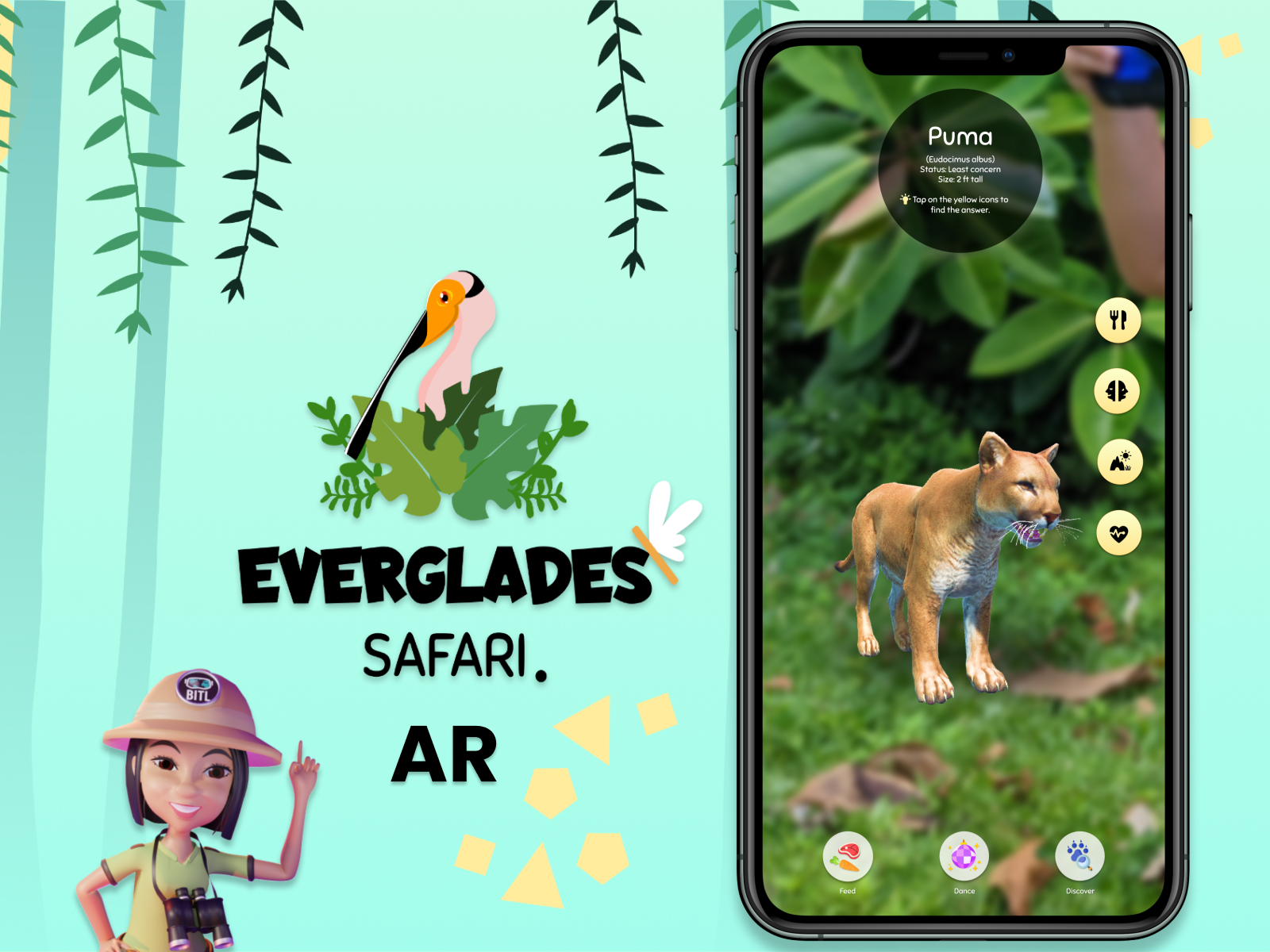
Species encounter — Puma
A 3D puma in the park camera view, with a fact overlay and yellow icons for diet, habitat, and health. Feed, Dance, and Discover sit on the bottom bar.
Technologies used
Impact
Library experience
Digitized
Moved the Cybrarium lesson onto the phone — species, collection, and a 3D-printed prize next door.
On-site safari
Gamified
Feed, dance, discover, and collect a Biodex so learning stays play in the park.
STAR case
On-site Everglades safari
Situation
People who wanted to visit and learn about the Everglades often did not know how to start, and the ecosystem still felt distant from everyday downtown life.
Task
Design a free AR safari in Losner Park that teaches Everglades and Biscayne Bay species through play.
Action
Designed the visitor loop and species-encounter interface — site-specific markers, educational overlays, Feed / Dance / Discover, and a Biodex that ends at the Cybrarium.
Result
Shipped as a free iOS education app with BITL and The Everglades Foundation, sponsored by the City of Homestead. Players who discover every species collect a 3D-printed sculpture next door.