Yourway Learning
Student engagement experience
AI that puts teaching first — less prep time, more classroom engagement, and teachers still in control of generated content.
Project brief
Owned end-to-end UX and product for teacher web, classroom app, and student-facing activities at Yourway Learning. Used an agentic AI design workflow — Figma, Claude Design, and Cursor — to move from research to high-fidelity prototypes while keeping teachers in control of generated content.
Problem to address
Teachers spend more time on preparation and admin than actually teaching — 38% on lesson prep and 15% on admin, versus 32% in the classroom.
Goals
- Reduce lesson preparation time
- Increase classroom engagement
- Keep teachers in control of AI-generated content
Design process
Design Thinking, accelerated with agentic AI — used to pick the right research and production tools at each phase.
Problem
Empathize
- Pre-shapes
- FocusBenchmark
- User journeys
Define
- AI-grouped patterns
- Cluster into action points
Solution
Ideate
- Figma wireframes
- Claude Design hi-fi
Prototype & Test
- Claude flow prototypes
- FocusCursor-mounted HTML
Methods
Tools
Research insights
Teacher time distribution
How teachers spend their week — the data that framed the problem.
53%
Prep + admin
vs
32%
Teaching
- Lesson preparation38%
- Teaching32%
- Administrative tasks15%
- Grading & feedback10%
- Professional development5%
Teachers spend more time on preparation and admin than on actually teaching.
Competitive benchmark
A competitive scan of teacher-facing AI products. Most offer a tool or a chat. Few combine a filtered tool bank, live classroom control, and student activities that go beyond chat.
| Product | Tool library | Live control | Beyond chat | Gamification | Class data |
|---|---|---|---|---|---|
| Yourway | Strong | Strong | Strong | Strong | Strong |
| Flint | Partial | Partial | — | — | Partial |
| MagicSchool | Strong | — | — | — | Partial |
| Canva | Partial | — | — | — | — |
| Brisk | Partial | — | — | — | — |
| Wayground AI | Partial | Partial | Partial | Partial | Partial |
| SchoolAI | Partial | Partial | — | — | Partial |
| Snorkl | — | — | Partial | — | Partial |
User journeys
Create an interactive activity
The teacher's journey from a flat lesson to reviewing results — mapped as goal, action, emotion, and opportunity at each step.
Identify the need
Frustrated
- Goal
- Find a way to make a lesson more engaging.
- Action
- Reflects on a lesson that fell flat and searches for ideas.
- Opportunity
- A short problem-finder quiz could suggest activity types.
Research AI tools
Overwhelmed
- Goal
- Understand what AI tools exist for this purpose.
- Action
- Googles AI tools for teachers, reads roundups, and asks colleagues.
- Opportunity
- One trusted directory filtered by subject and grade saves time.
Sign up and get access
Cautious
- Goal
- Get access to a tool that fits the class.
- Action
- Signs up with a school email and sets up a free or district account.
- Opportunity
- Single sign-on with school systems removes a barrier.
Explore features
Curious
- Goal
- Learn what the tool can actually do.
- Action
- Clicks through templates, watches a tutorial, and tries a demo.
- Opportunity
- A two-minute guided sample beats a blank template.
Design the activity
Focused
- Goal
- Build an activity aligned to learning objectives.
- Action
- Writes prompts, sets grade level and topic, and adds a rubric.
- Opportunity
- Auto-align prompts to standards to save planning time.
Test it
Nervous
- Goal
- Confirm the activity works as intended.
- Action
- Tries the activity as a student would and checks tone and accuracy.
- Opportunity
- A preview-as-student mode and fact-check flag build trust.
Run it in class
Confident
- Goal
- Run the activity smoothly with students.
- Action
- Shares a link or QR code, monitors screens, and answers questions.
- Opportunity
- A live teacher dashboard reduces mid-class anxiety.
Review results
Satisfied
- Goal
- Know if it actually helped students learn.
- Action
- Checks completion data, reads output, and adjusts for next time.
- Opportunity
- An auto-generated summary of gains to share with admin or parents.
Design decisions
Filter the AI tool bank by subject and job
Teachers were overwhelmed hunting for the right AI tool. Subject ecosystems plus purpose filters — lesson planning, assessment, engagement — make finding a tool a scan instead of a search.
Keep the teacher in control of live activities
AI-generated content only works if the teacher stays in charge. The live dashboard and toolbar let them watch progress, add time, pause, or finish the activity from the classroom.
Move student interactions beyond chat
The existing activity model was chat-only. Quizzes, checkpoints, and review give students more ways to engage without turning the lesson into a chatbot.
Gamify with Octalysis, without weakening pedagogy
Avatars and game loops raise classroom engagement, but only if they serve the lesson. Octalysis shaped the loops so narrative and motivation stay secondary to learning.
Product screens
Web
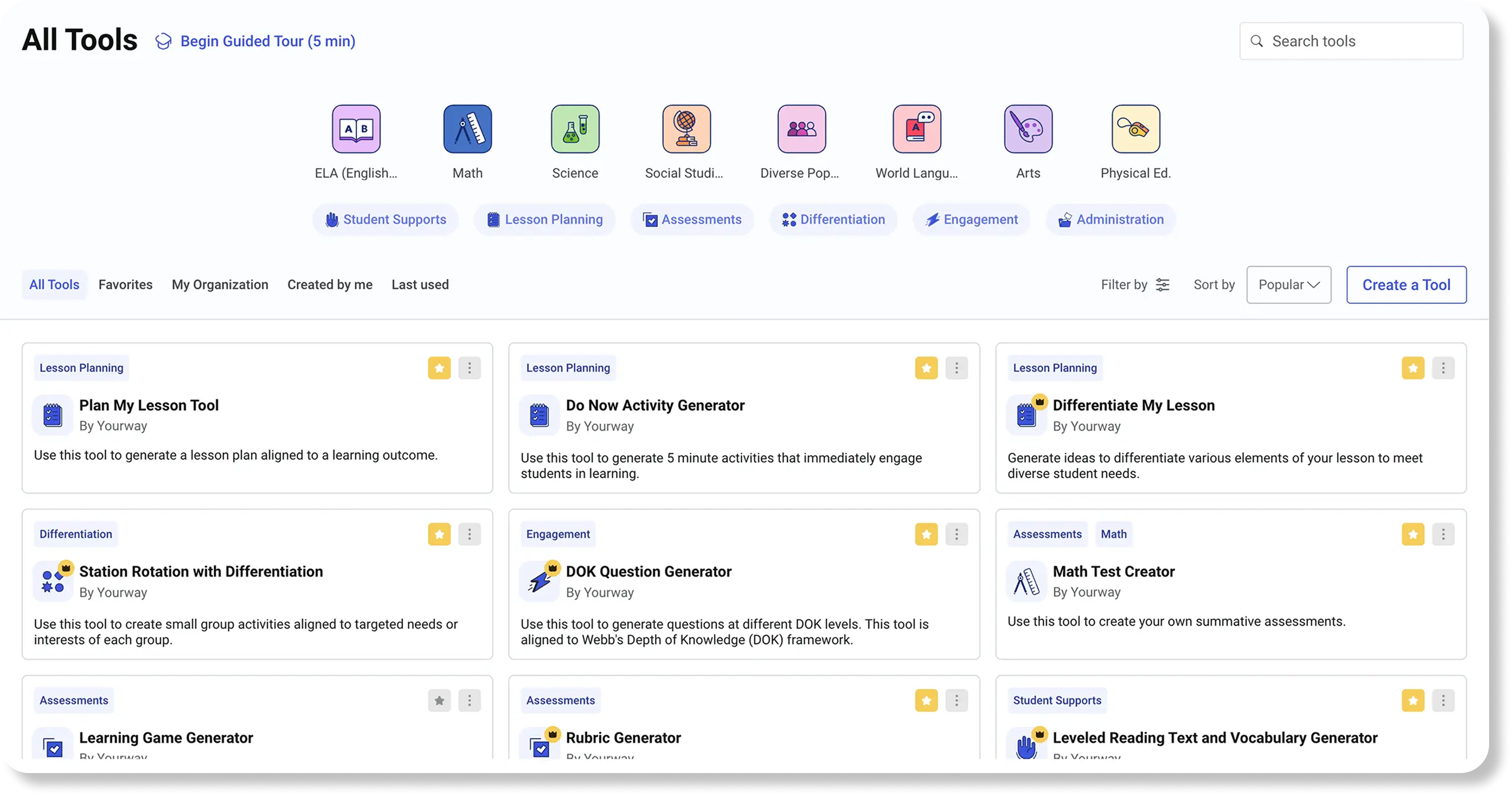
AI tool bank and category system
Clearer information architecture, hierarchy, and filters so teachers can find tools by subject and job to be done.
Teacher web app
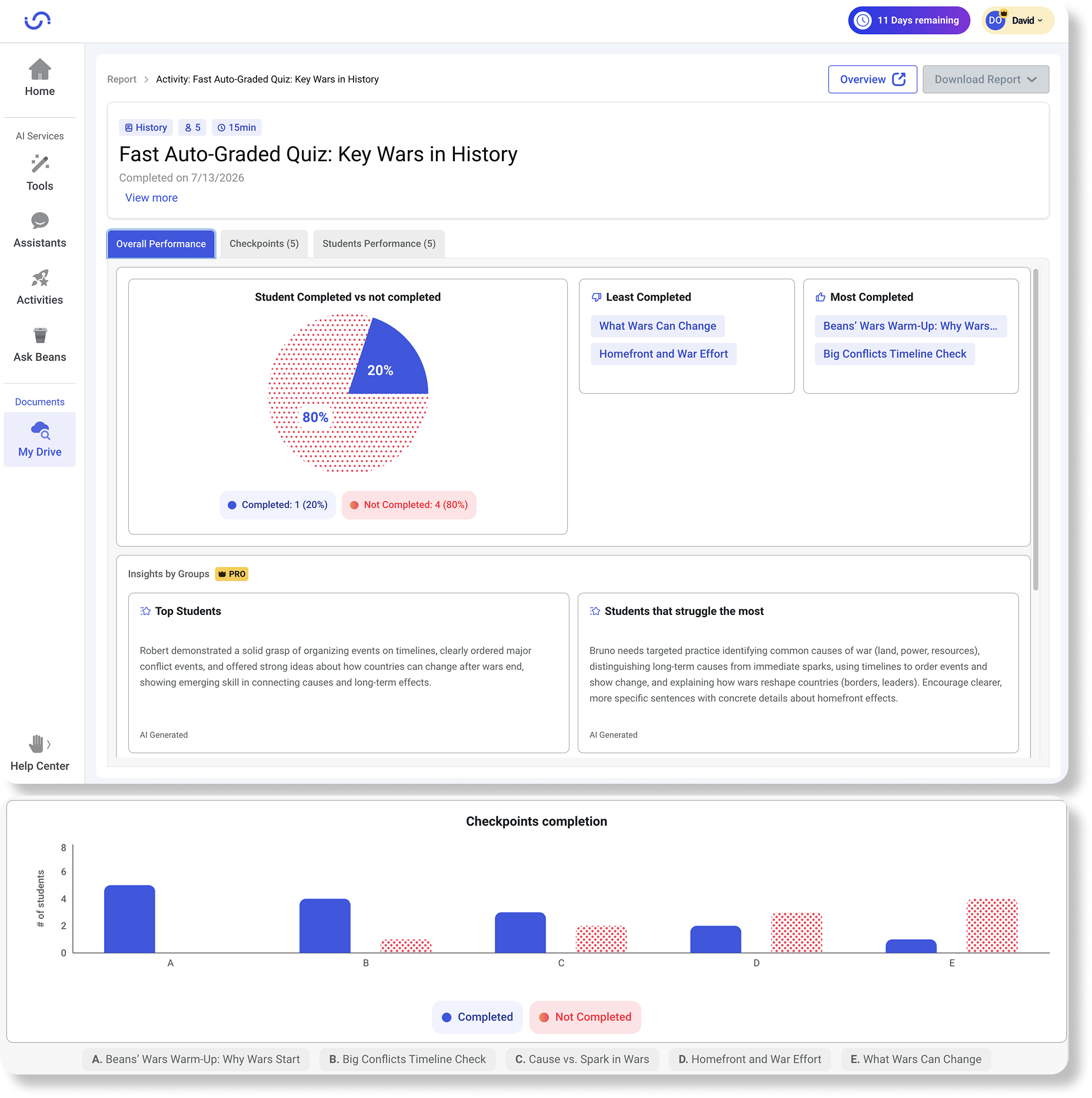
Overall performance
Class completion, checkpoint trends, and AI-generated group insights so teachers can see who is moving and who needs help.
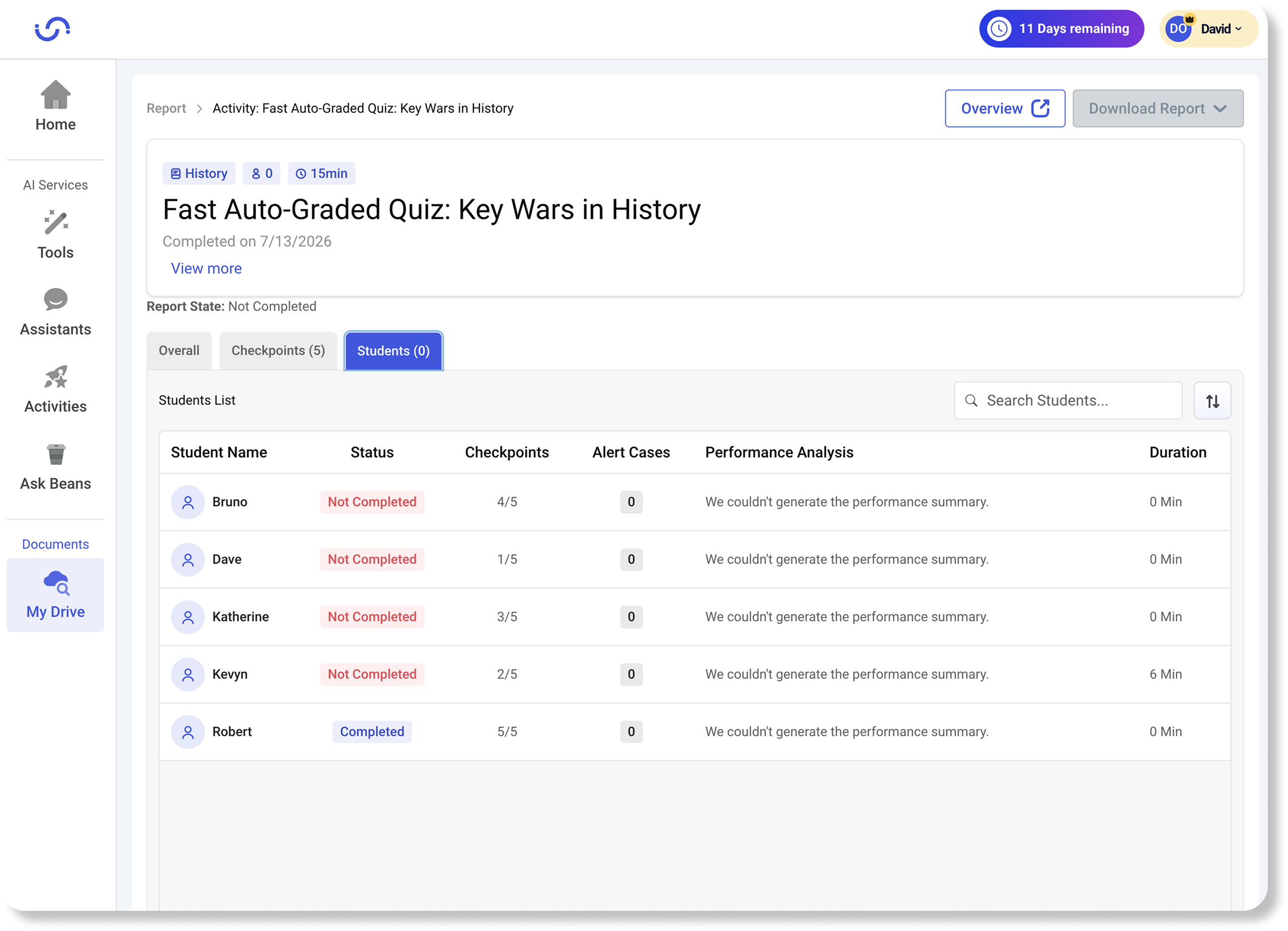
Student performance list
Per-student status, checkpoints, alerts, and duration so teachers can scan the class and open the right student.
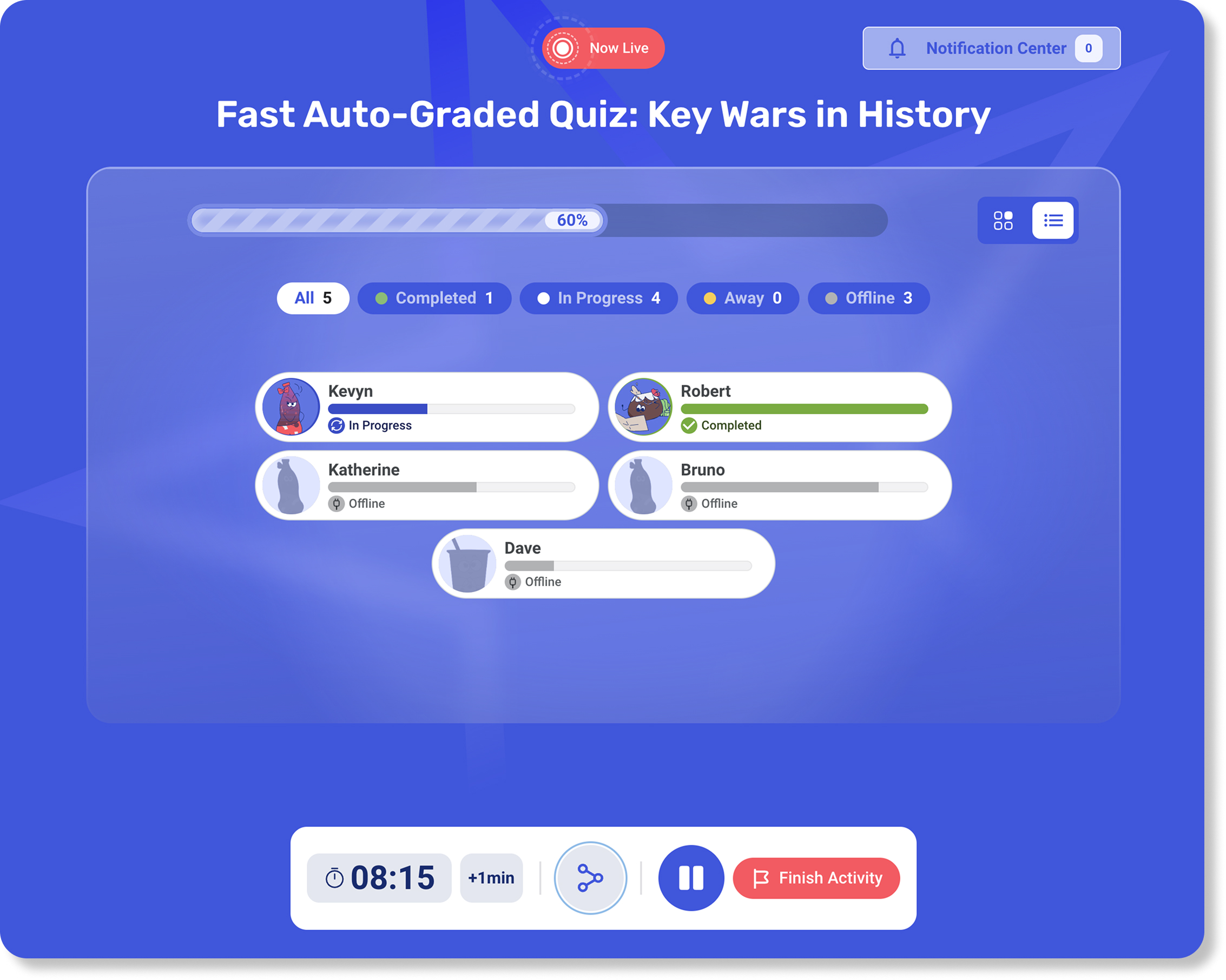
Live dashboard and activity control
Live progress, online status, and a toolbar to time, pause, or finish the activity from the classroom.
Student responsive web app
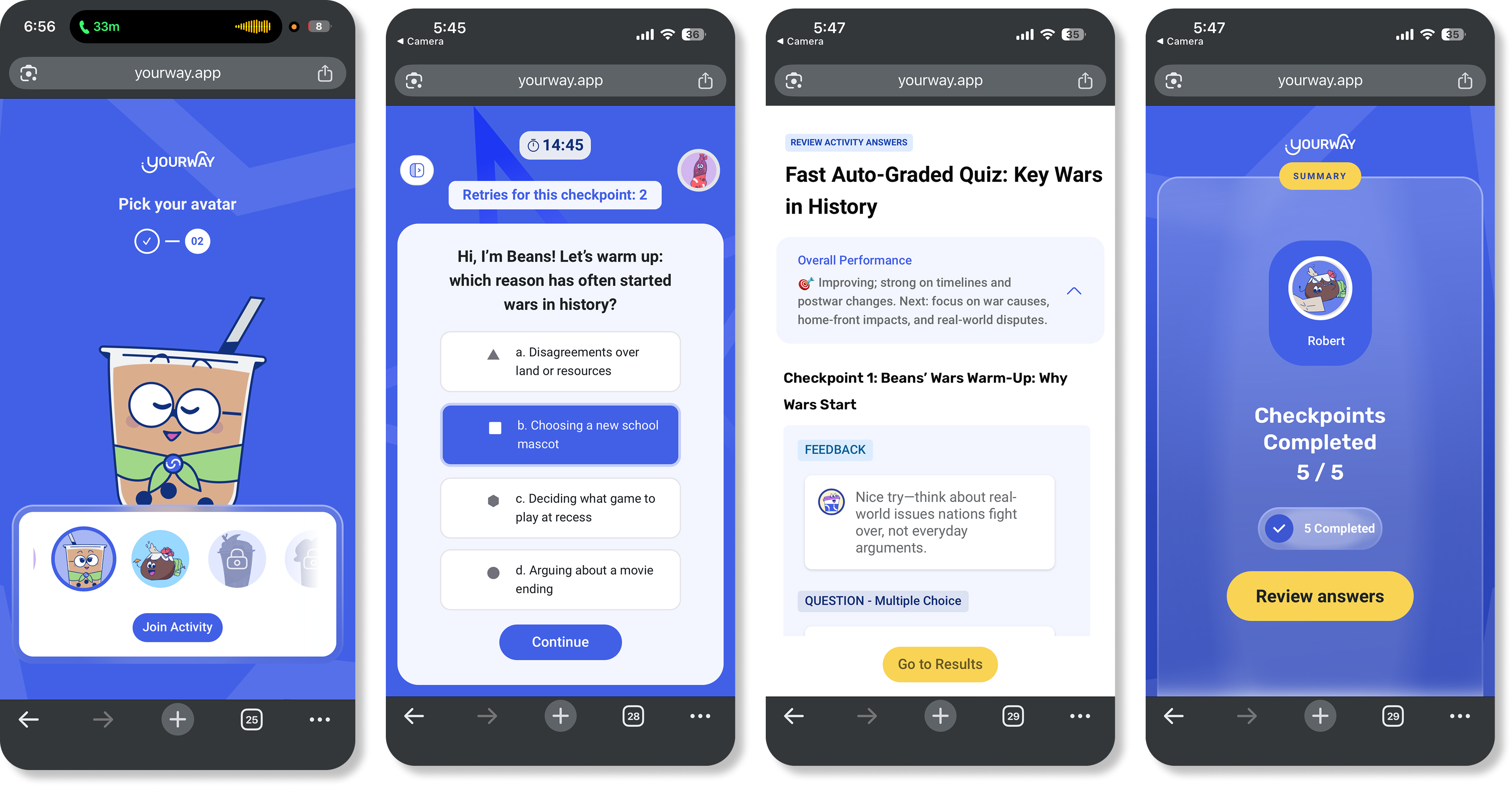
Interaction diversity, gamification, and avatars
Interactions beyond chat, Octalysis-informed game loops, and avatar selection that support the activity narrative without weakening pedagogy.
Leadership & performance
Grew from UX design into product management ownership — shaping strategy, prioritizing opportunities, defining requirements, and partnering with engineering from concept through delivery. Organized the design team around efficient, user-centric workflows (Design Ops).
Impact
Monthly User Activities
16%
Features into licenses
30K
New activity ecosystem tied to license revenue.
Design Ops
Team systems
Organized the design team around efficient, user-centric workflows.
STAR case
Creating Activities
Situation
The live activity model was chat-only, which limited how students could engage with AI-generated lessons.
Task
Design the full new activity experience and add gamification without weakening pedagogical needs.
Action
Ran a Double Diamond pass with competitive journeys and Octalysis, then designed the new activity ecosystem across teacher controls and student-facing surfaces.
Result
Shipped the new activity ecosystem and helped close about 30,000 licenses.