Fortnite — Epic Games (via Globant)
In-game Locker redesign
Redesigned the Fortnite Locker and loadout presets across console, PC, and mobile so returning players could set a look faster, with actions that actually meant what they said.
Project brief
Redesign Fortnite’s in-game Locker so a returning player can set a loadout, randomize a full look, and save it as a named preset — the same pattern on Desktop, Switch, PlayStation, Xbox, and Mobile. Move the Locker off a matrix onto a categorized list so new cosmetic types can grow without breaking the layout.
Problem to address
The Locker is how players dress for a match, but it fought them. Cosmetics sat in a matrix, so every new type — cars, instruments, LEGO kits — needed another cell the layout could not absorb. Shuffle in one slot could change the look next game. Saving a preset did not let them name it — on create or overwrite — so the list filled with copies. Button labels did not match the action, and they broke in other languages. All of that had to stay coherent on five platforms.
Goals
- Speed up loadout setup
- Raise Locker usage
- Add randomize, reset, and save without breaking console, PC, or mobile patterns
- Scale the Locker with a categorized list so new cosmetics can ship without a layout rewrite
Design process
Double Diamond, with extra weight on competitive benchmarking and playtesting.
Problem
Discover
- Desktop research
- FocusBenchmark
Define
- User journeys
- Affinity diagram
- Flowcharts
Solution
Prototype
- Wireframes
- Low-fi
- Design system + greyscale
Deliver
- Hi-fi in Figma
- FocusUser testing
- UX writing
Methods
Tools
Research insights
Insight
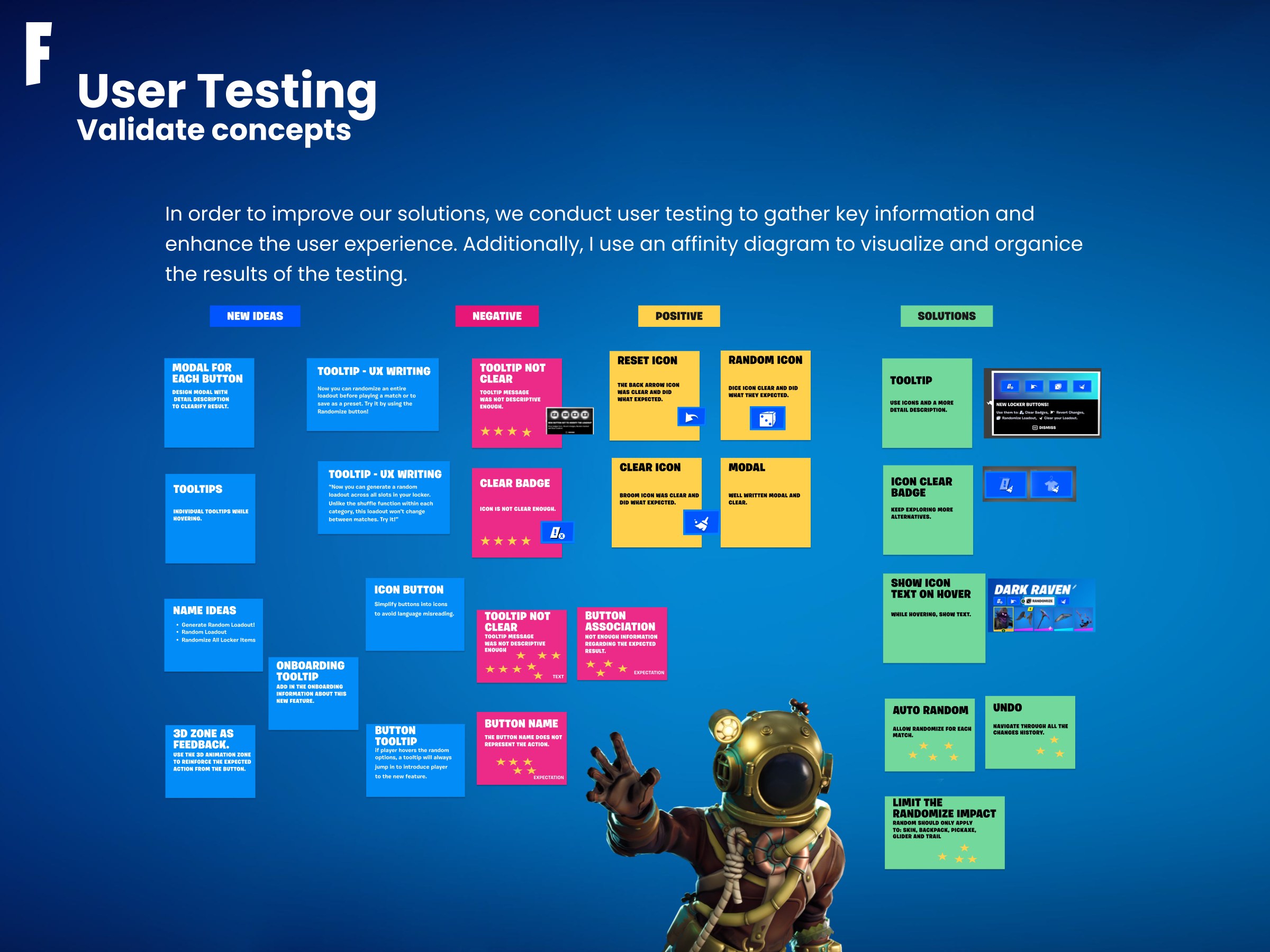
Playtest affinity — Randomize loadout
UserTesting notes clustered into new ideas, negatives, positives, and solutions. Tooltips were not descriptive enough; dice and broom icons were clear; randomize had to be limited to skin, backpack, pickaxe, glider, and trail.
User journeys
Set a loadout before the match
Open the Locker, try a look, save it as a named preset, then ready up.
Open the Locker
Rushed
- Goal
- Get a loadout ready before queueing.
- Action
- Opens the Locker from the lobby and scans equipped slots.
- Opportunity
- Saved load tiles make the current look readable at a glance.
Equip across slots
Focused
- Goal
- Build a look from skin, backpack, pickaxe, glider, and trail.
- Action
- Picks items slot by slot, or leaves some on the last match.
- Opportunity
- Clear slot chrome so five platforms share the same map of the body.
Randomize or reset
Curious
- Goal
- Try a full look without rebuilding every slot.
- Action
- Hits randomize for a whole loadout, or reset / clear to start again.
- Opportunity
- Randomize must not be shuffle-per-slot — that look changes between matches.
Save and name the preset
Careful
- Goal
- Keep this look without losing the last one.
- Action
- Quick Saves, Saves As New, or overwrites — and names the preset either way.
- Opportunity
- Name on create and on overwrite so players stop spawning untitled copies.
Ready up
Ready
- Goal
- Take the look into the match.
- Action
- Leaves the Locker with the preset equipped.
- Opportunity
- Key binds and shuffle stay available without another hunt through the menu.
Design decisions
Icons instead of long button labels
The button name did not represent the action, and text was easy to misread across languages. Dice, broom, and back-arrow icons did what testers expected; a badge icon did not, so we kept exploring.
Rewrite Randomize so it beats shuffle-per-slot
The first tooltip was not descriptive enough. The shipped line: generate a random loadout across all slots; unlike shuffle in each category, this look will not change between matches.
Limit randomize to cosmetic slots
Playtests asked to cap the blast radius. Randomize applies to skin, backpack, pickaxe, glider, and trail — not every slot in the Locker.
Name presets on create and on overwrite
Players could not rename when they overwrote, so they spawned a new preset every time they changed a look. Naming on create and on overwrite lets them manage the list without copies.
Leave the matrix for a categorized list
A matrix could not take new cosmetic types without another cell and another break. A list with precise categories — character, emotes, wraps, cars, instruments, LEGO kits — lets the Locker grow without rewriting the layout.
User flows
Randomize a loadout — or keep shuffle
Shuffle still lives per category and changes between matches. Randomize hits the whole loadout, stays until the next randomize, and only touches cosmetic slots.
Shuffle (per slot)
- Open a categorySkin, backpack, pickaxe…
- ShuffleRandom item in that slot only
- IfKeep it?This look can change next matchNoShuffle againStill one slot
- QueueSlot may reshuffle later
Randomize (whole loadout)
- Hover RandomizeTooltip vs shuffle
- RandomizeSkin, backpack, pickaxe, glider, trail
- 3D previewThe zone confirms the new look
- IfKeep this look?Does not change between matchesNoReset or clearStart the loadout again
- Quick Save or Save As NewName the preset
Low-fi mocks
Low-fi
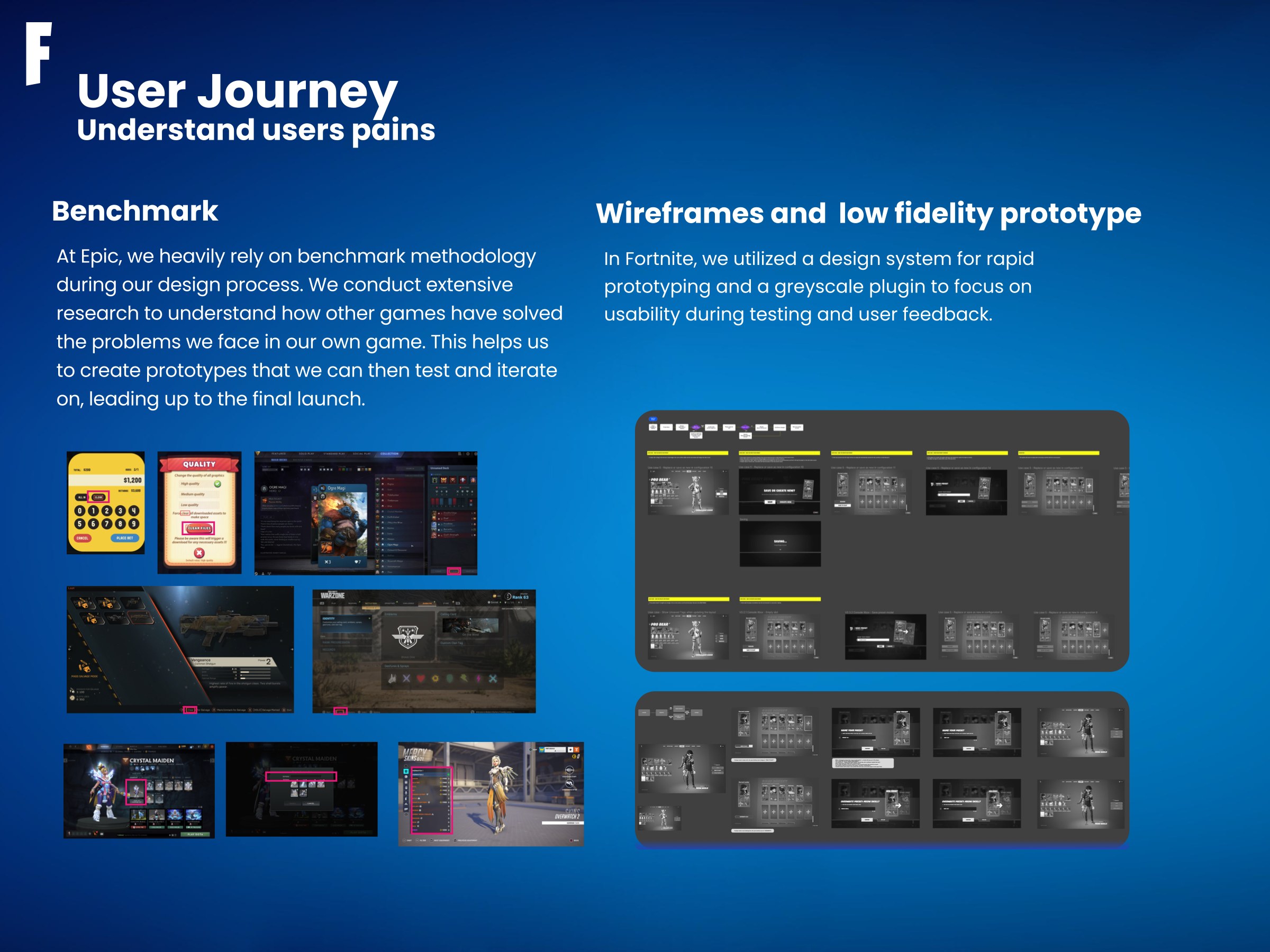
Benchmark and greyscale prototypes
Competitive locker patterns on the left; Fortnite design-system wireframes in greyscale on the right so playtests stayed on usability, not color.
Product screens
Console
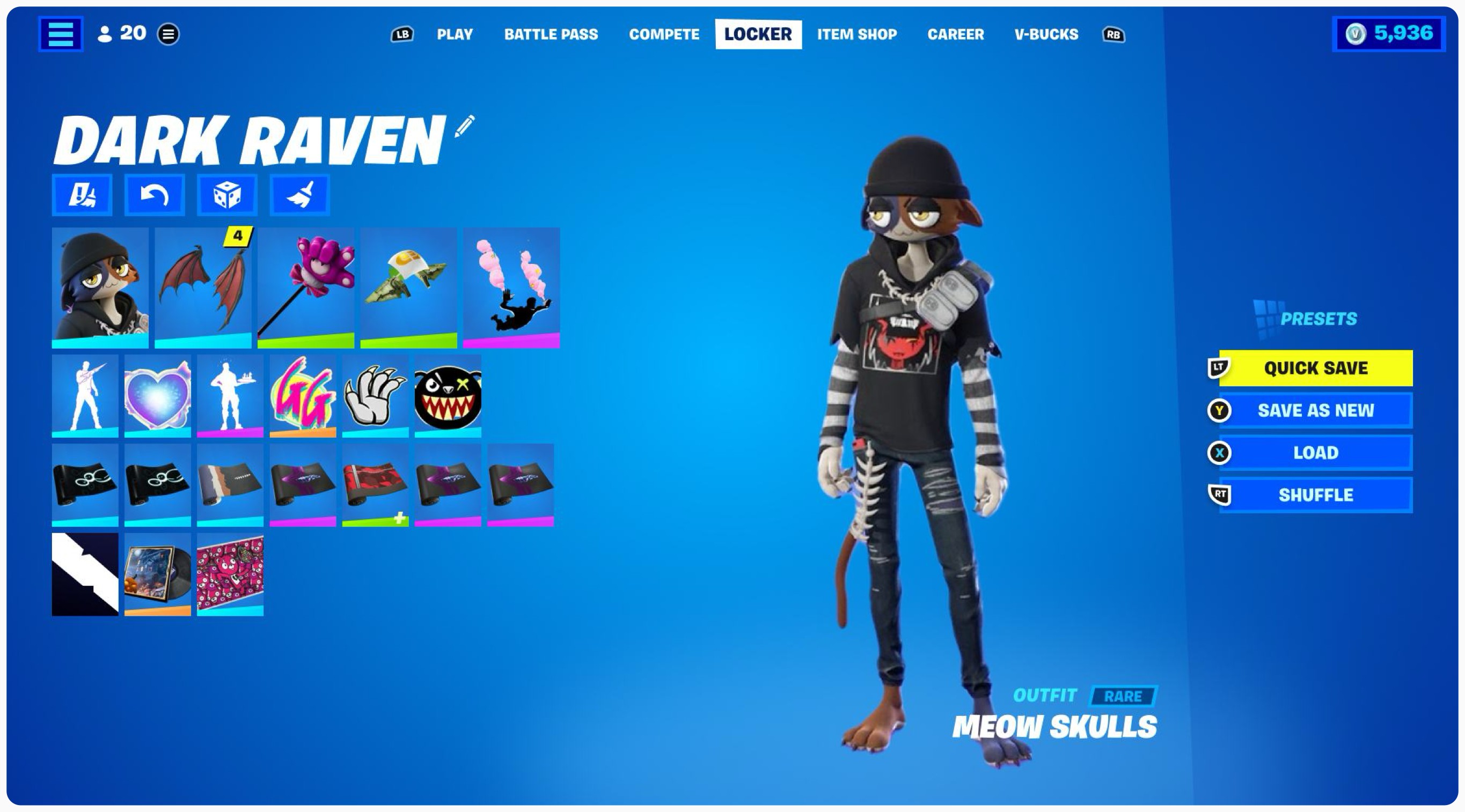
Loadout — randomize, reset, save
Icon actions on the loadout, plus Quick Save, Save As New, Load, and Shuffle — the path that sped setup by up to 14%.
Locker
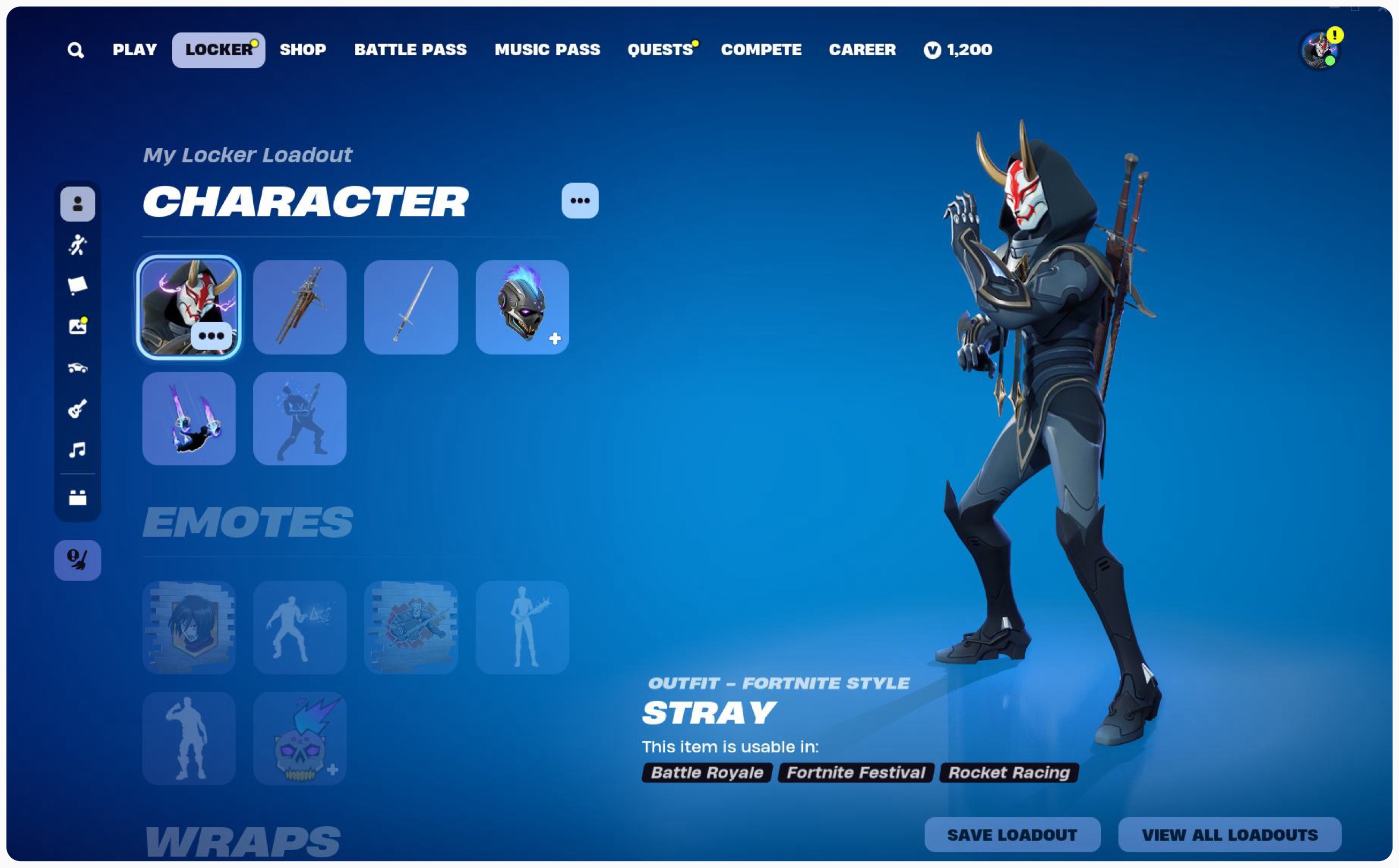
Character loadout
My Locker Loadout with Save Loadout and View All Loadouts — cosmetics that work across Battle Royale, Fortnite Festival, and Rocket Racing.
Presets
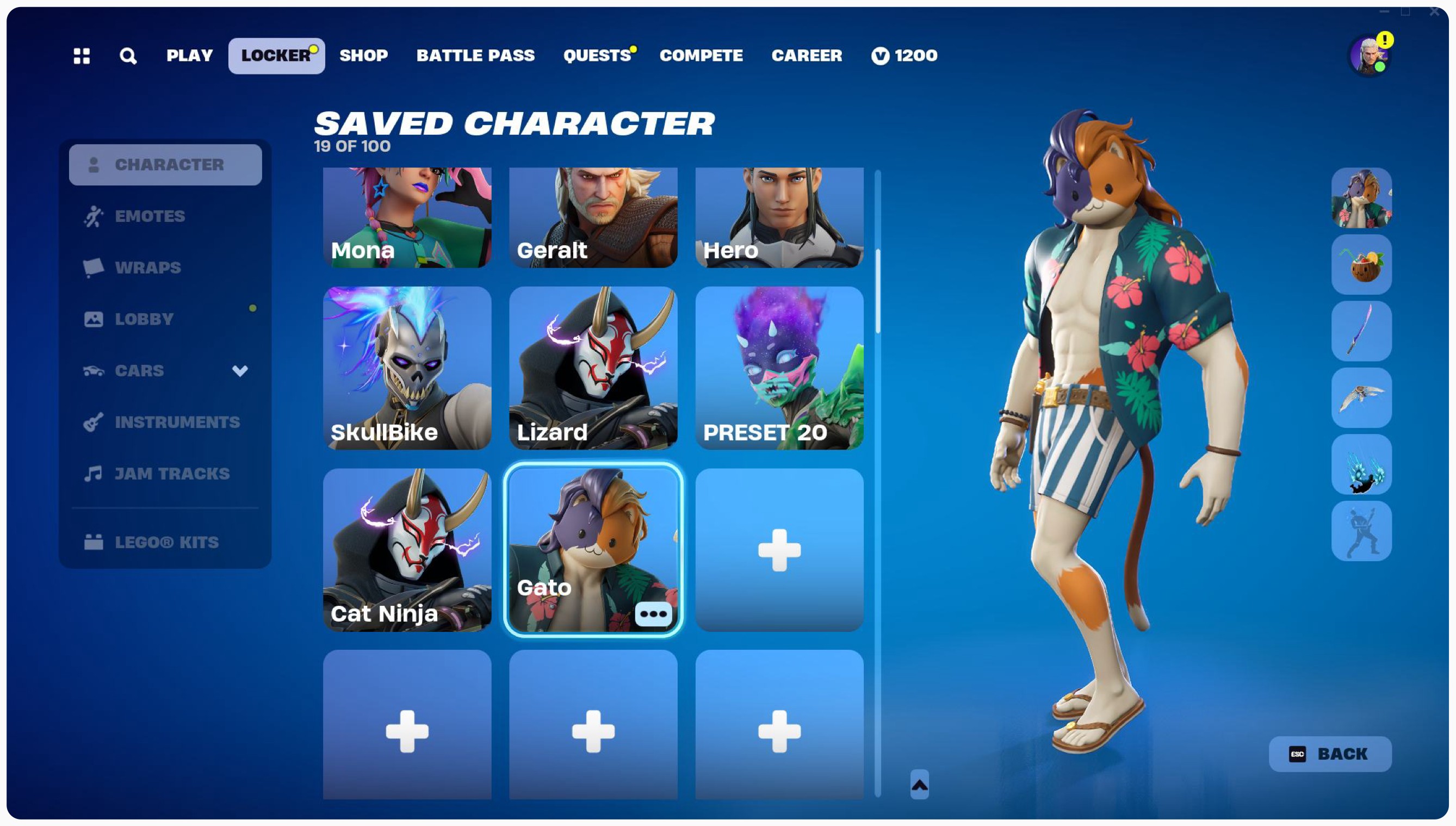
Saved character tiles
Named presets in a grid — 19 of 100 — beside a categorized list (character, emotes, wraps, cars, instruments, LEGO kits) so new cosmetic types can grow without a matrix.
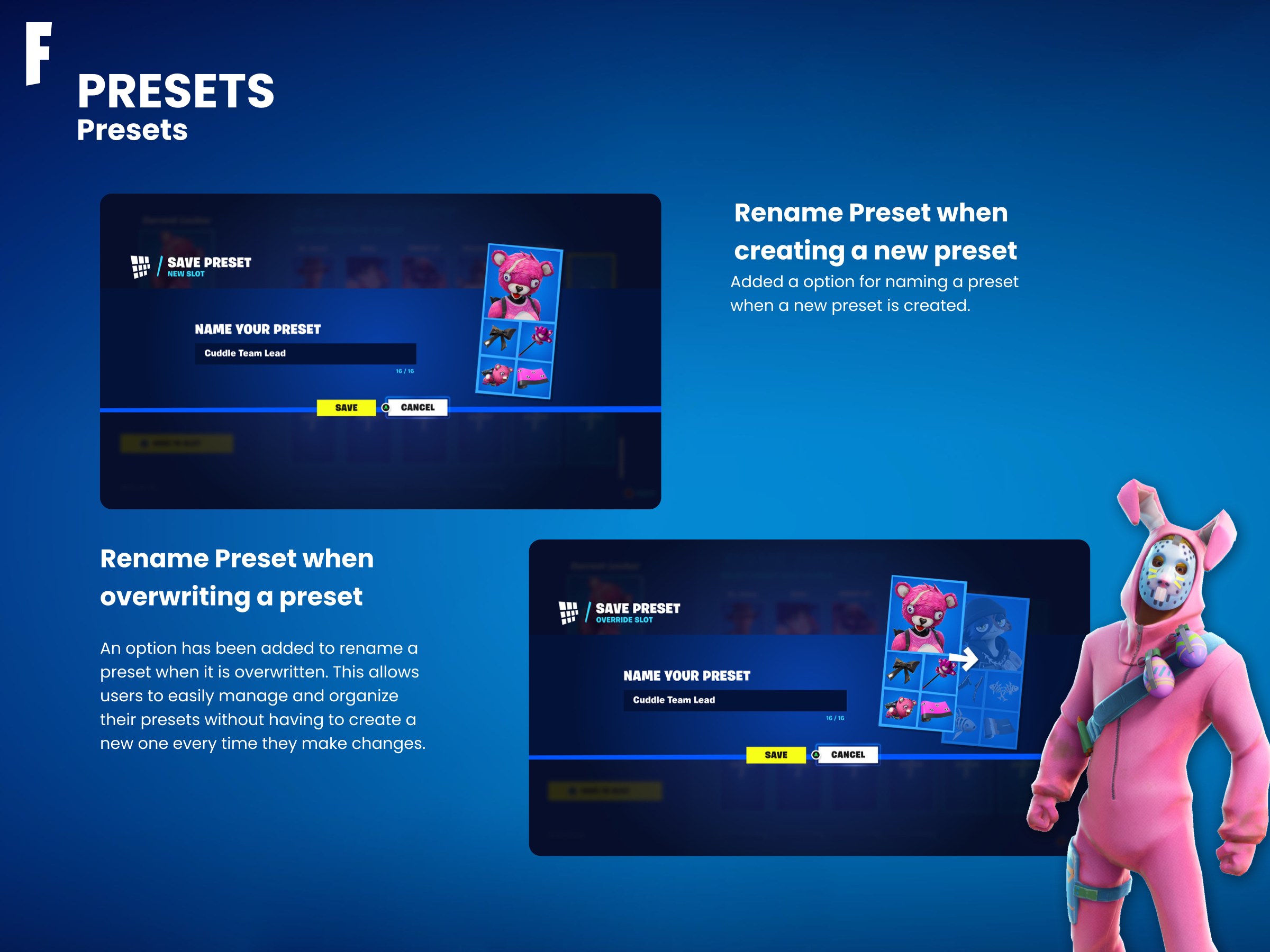
Name a preset on create and overwrite
Name Your Preset when saving a new slot, and again when overwriting, so players can organize looks without spawning a copy every change.
Leadership & performance
The team owned the redesign of the loadout preset system — saved load tiles, shuffle, key binds, flows, and user testing — and moved cosmetics from a matrix to a categorized list so the Locker could scale.
Impact
Players returned
200k+
Players who came back to Fortnite after the new features — team-wide.
Loadout setup
up to 14% faster
Players set a loadout quicker after the Locker updates.
Cosmetics ecosystem
Matrix → list
Categorized list so new cosmetic types grow across environments without a layout rewrite.
STAR case
Randomize a whole loadout
Situation
Returning players set a loadout in the Locker before every match. Shuffle existed per category and changed between matches, so trying a full look was slow and easy to confuse. The Locker had to stay consistent on Desktop, Switch, PlayStation, Xbox, and Mobile.
Task
Redesign the loadout and preset system — randomize, reset, clear, quick save, save as new, and preset naming — move cosmetics from a matrix to a categorized list so new types can scale, and prove it in playtests.
Action
Ran Double Diamond. Benchmarked how other games solved locker problems. Prototyped in the Fortnite design system with a greyscale plugin so tests focused on usability. Clustered UserTesting notes in an affinity diagram and iterated icons, tooltip copy, and which slots randomize could touch. Replaced the matrix with a categorized list so new cosmetics could ship without a layout rewrite.
Result
Loadout setup speed improved by up to 14%. About 200k+ players returned to Fortnite after the new features. Shipped randomize loadout, preset naming on create and overwrite, saved load tiles, shuffle, and key binds — and a Locker that can take new cosmetic types as a list, not a matrix.