Bankee
Download statements in the app
Get a monthly statement or a custom transaction PDF from Bankee without leaving the phone — and without a support ticket.
Project brief
Design an in-app way to download a monthly bank statement or a custom date-range of transactions as a PDF, so people do not have to leave the mobile app or call support.
Problem to address
People struggle to get a bank statement or a transaction history. The download is hidden, confusing, or sends them to the web. That friction fills the support queue.
Goals
- Download transaction history quickly
- Feel confident the exported document is accurate
- Share statements with accountants, lenders, or for personal finance
- Stay inside the mobile app
- Reduce support tickets about bank statements
Design process
Discovery, Define, then Ideation & Test — a five-day challenge to get statements and transaction history out of the app as a PDF.
Problem
Discovery
- Desktop research
- FocusBenchmark
Define
- Pain points
- Affinity diagram
- Impact vs effort
Solution
Ideate
- Flowcharts
- Wireframes
Ideation & Test
- FocusMaze usability test
- Hi-fi
- Recoverable errors
Methods
Tools
Research insights
Insight
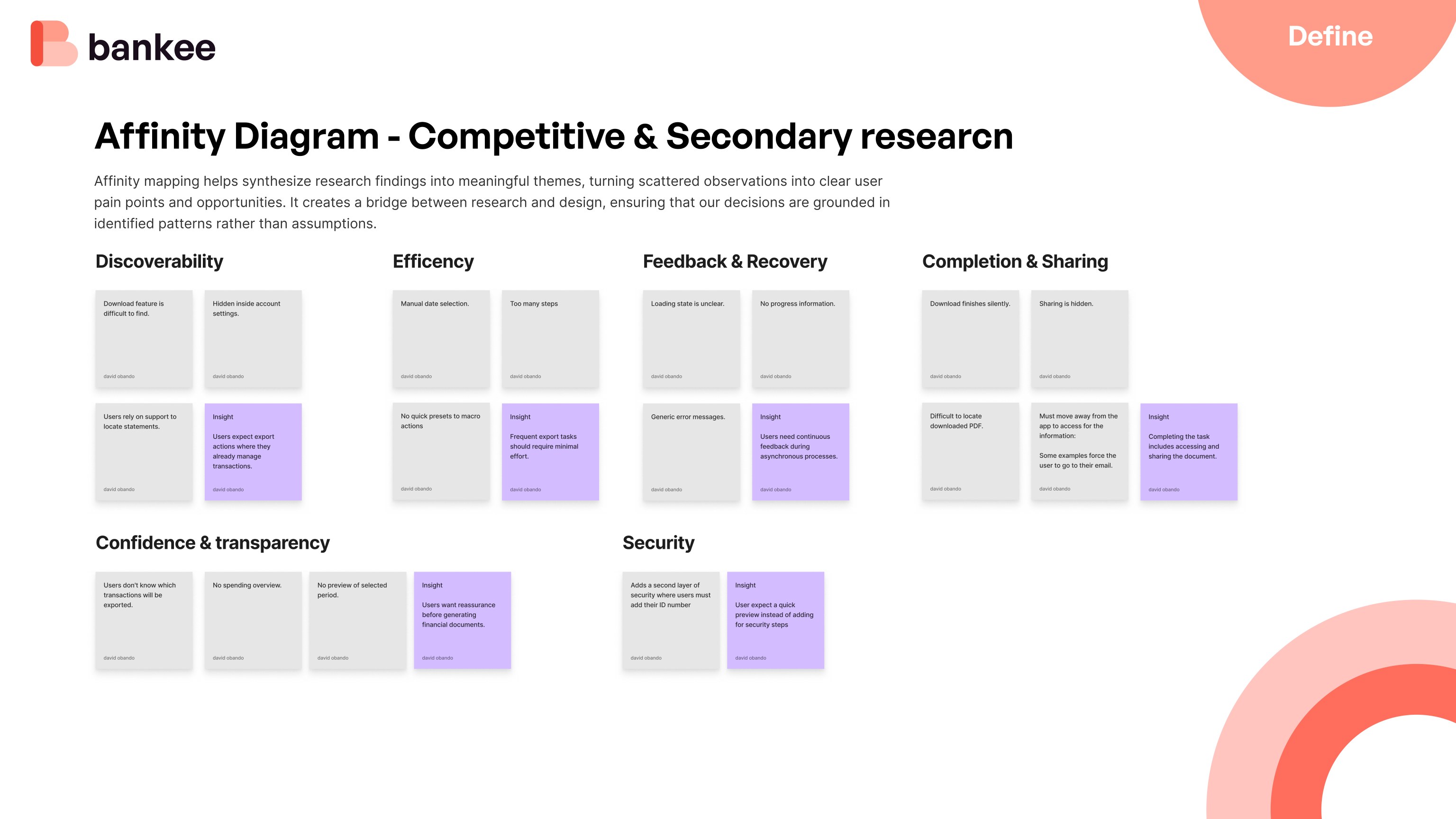
Affinity — competitive and secondary research
Discoverability, efficiency, feedback, sharing, confidence, and security. The pattern: people expect export where they already manage transactions, and they want a preview before the file exists.
Insight
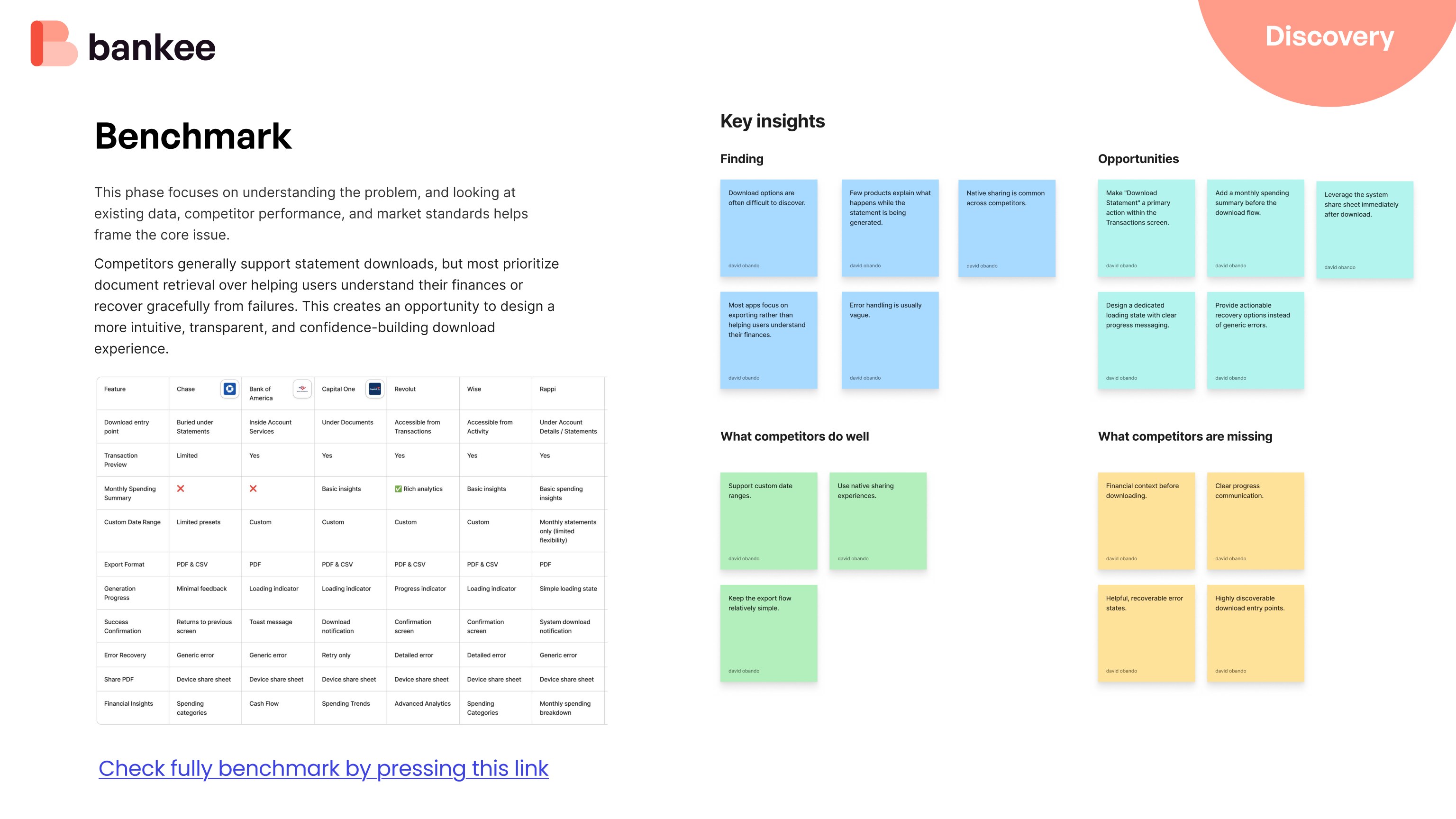
What competitors miss
Banks support downloads. Few explain the money, show progress, or recover from a failed generate. Opportunity: Download on Transactions, a loading state, a monthly summary, and errors you can act on.
User journeys
Get a PDF to the accountant — from the phone
The Maze tasks: July 2026 statement for taxes, then transactions from August 1–5. Stay on the phone. Do not open a laptop.
Need a document
Stuck
- Goal
- Send the accountant a statement or a date range.
- Action
- Opens Bankee on the phone, away from a computer.
- Opportunity
- The download has to live where they already read transactions.
Find Download
Unsure
- Goal
- See a way out without settings or the web.
- Action
- Looks on the activity list for an export.
- Opportunity
- A Download action on Transactions — then a modal that splits statement vs history.
Pick the document
Focused
- Goal
- Get the official month, or a custom range.
- Action
- Chooses Bank Statement or Recent Transactions, then a month or dates.
- Opportunity
- Presets for common ranges; start and end dates when they need custom.
Check before it generates
Cautious
- Goal
- Know the PDF is the right period and the right money.
- Action
- Reads a spend summary and a movement list.
- Opportunity
- Income, spent, remaining — then generate.
Share or save
Relieved
- Goal
- Get the file to Files, print, or the accountant.
- Action
- Uses the system share sheet from the preview.
- Opportunity
- If it fails, retry, change dates, or cancel — not a dead error.
Design decisions
Download on Transactions — then a modal
People expect export where they already read activity. A Download button is the entry. A modal keeps the list clean and splits Bank Statement from Recent Transactions without mystery icons.
Monthly statements first
A statement is the official document accountants and lenders ask for. Recent transactions sit second.
Show a spend summary before the PDF
Competitors jump to a date range with no context. Income, spent, and remaining let people check they have the right period before they generate.
Presets plus separate start and end dates
Today, last 7 days, last 30 days cover common asks. Split start and end fields make a custom range obvious on a phone. A single range calendar can be faster, but testers found it less clear.
User flows
Statement or transaction history
Two documents from one Download. A monthly statement is the official period. Recent transactions take a preset or a custom range. Both end in a native share.
Monthly statement
- TransactionsTap Download
- Bank StatementOfficial completed period
- IfPeriod available?Pick a monthNoNo statements yetOffer recent transactions instead
- Review summarySpend snapshot + details
- IfPDF generated?System builds the fileNoGeneration failureRetry or cancel
- Preview, share, doneNative iOS share
Recent transactions
- TransactionsTap Download
- Transaction historyUser-defined range
- IfValid range?Preset or start / end datesNoInvalid rangeAdjust the dates
- IfTransactions found?Count + spend summaryNoEmpty rangeChoose another period
- Preview, share, doneNative iOS share
Low-fi mocks
Low-fi
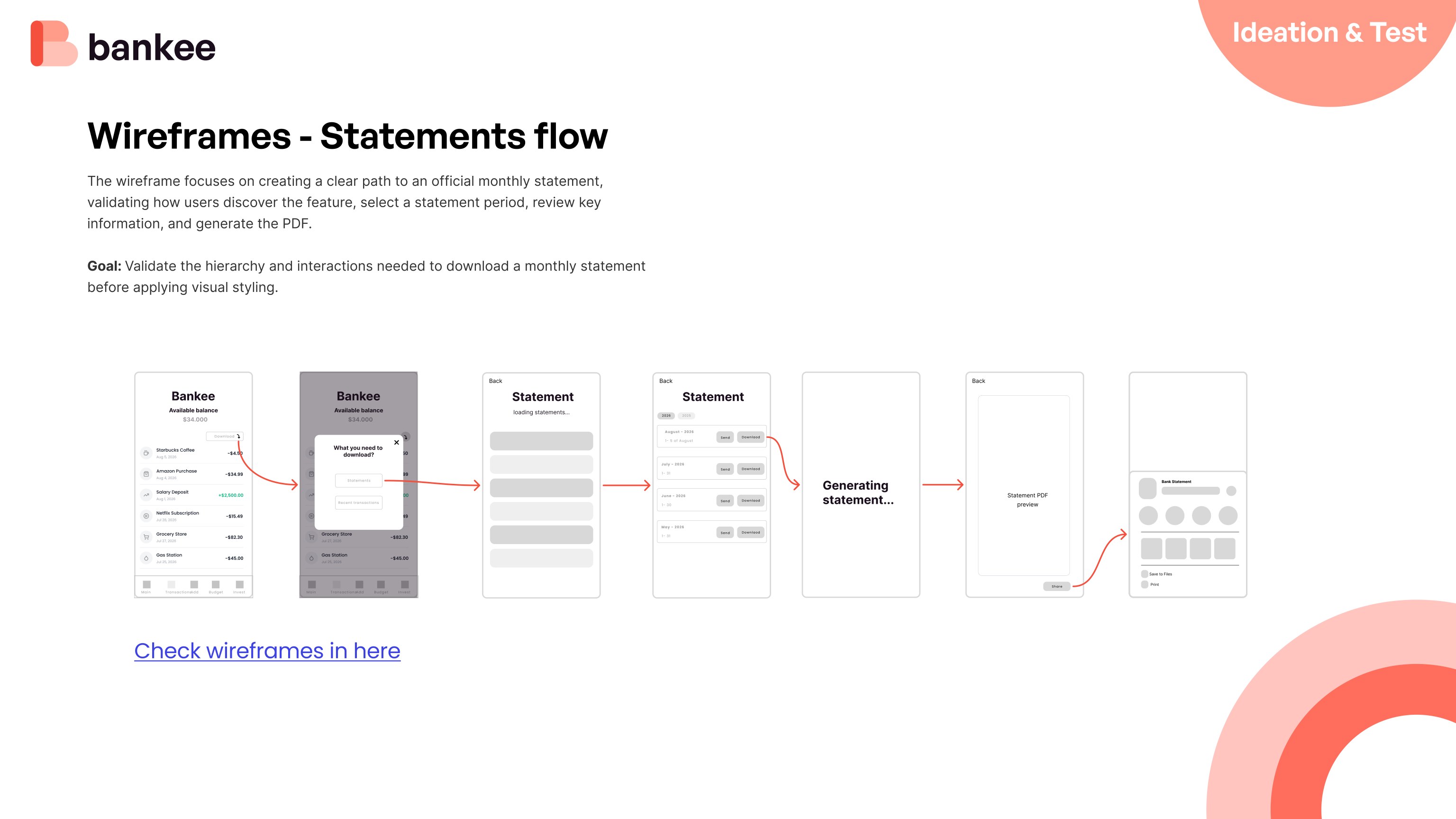
Statements wireframe
Discover Download, pick a month, review, generate, then share — hierarchy before visual style.
Low-fi
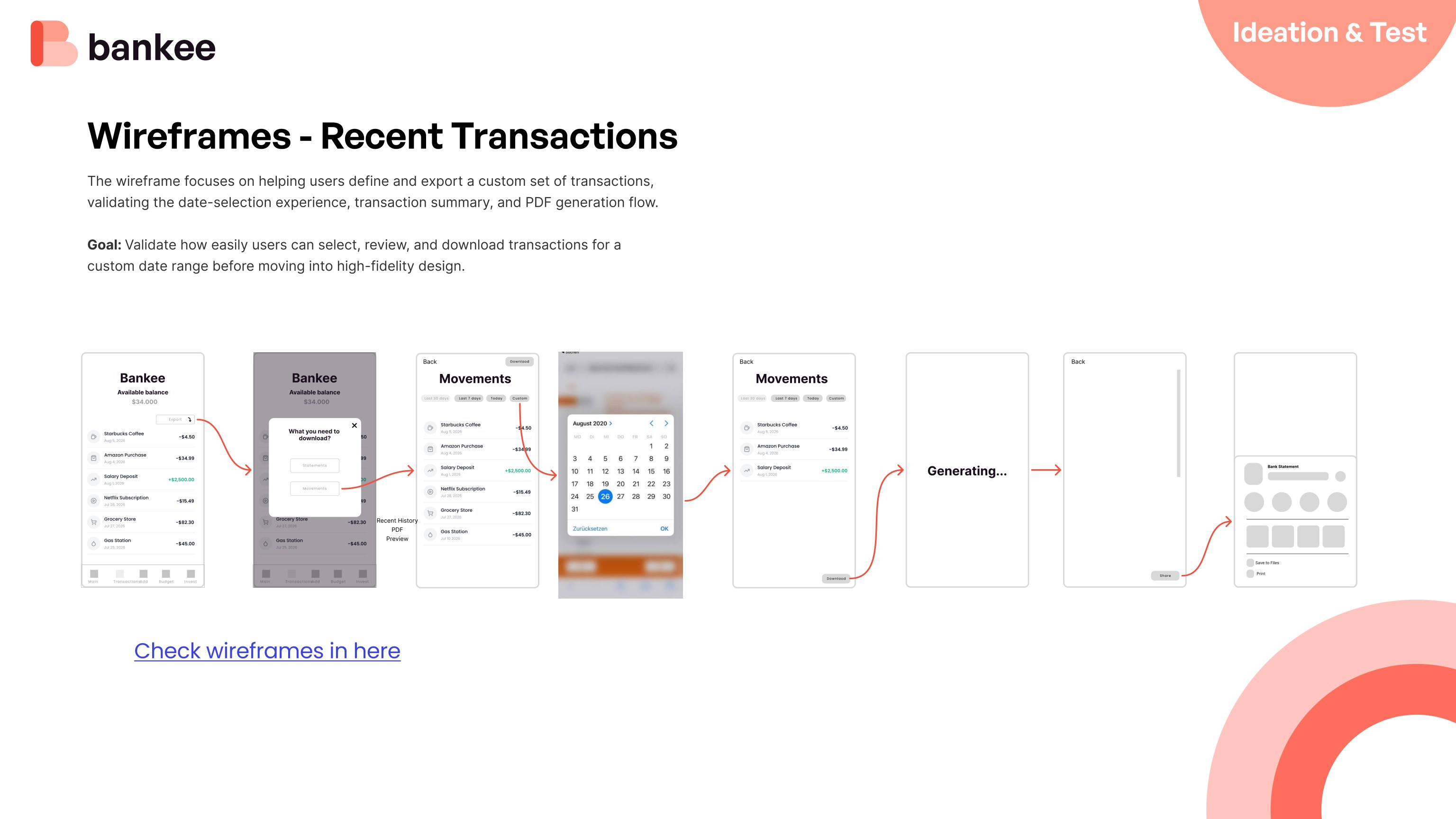
Recent transactions wireframe
Presets and a custom range, a summary, then the same generate-and-share close.
Product screens
Flow 1
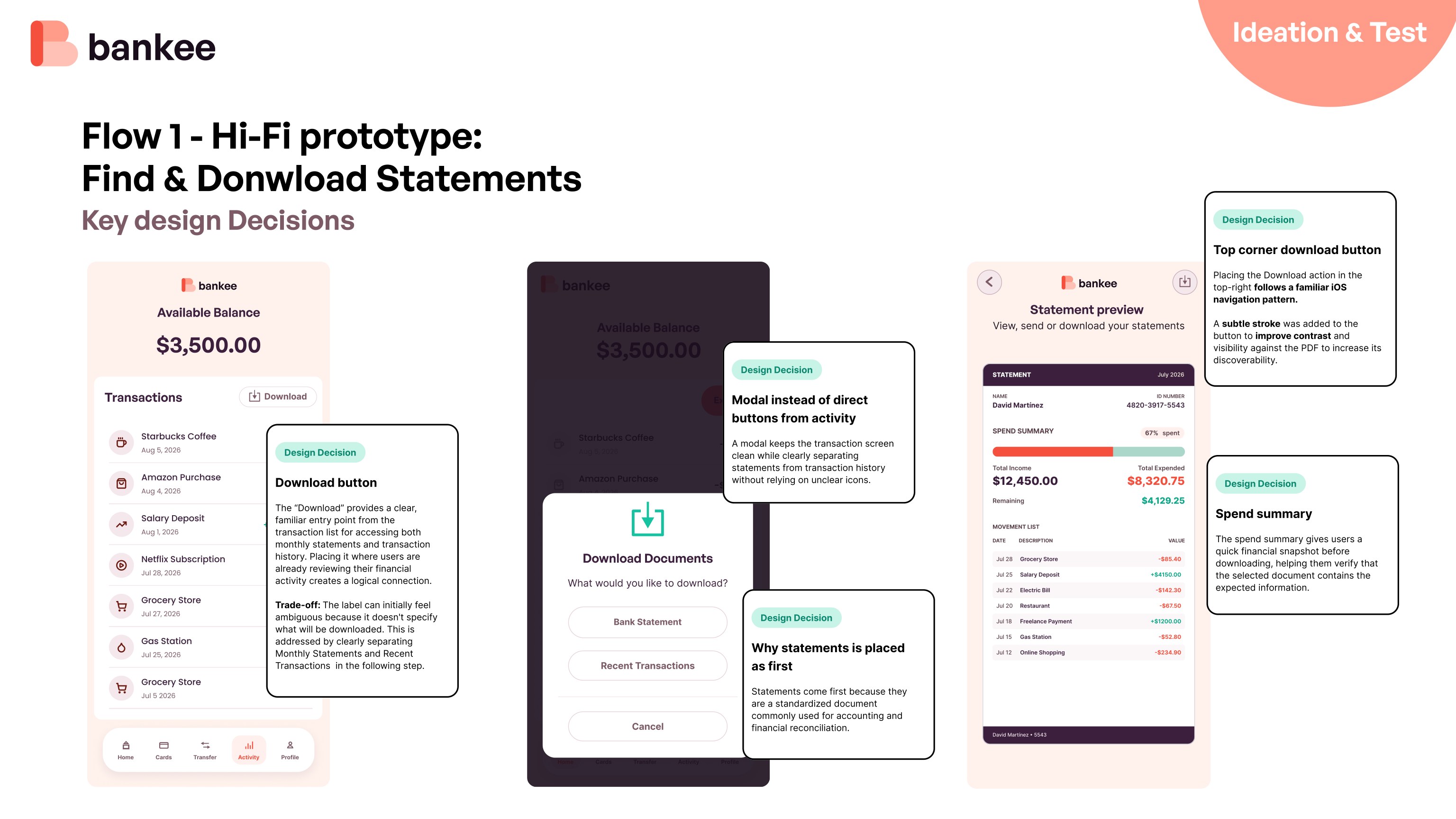
Download a monthly statement
Download on the activity list, a modal that splits Bank Statement from Recent Transactions, and a spend summary on the PDF preview.
Flow 2
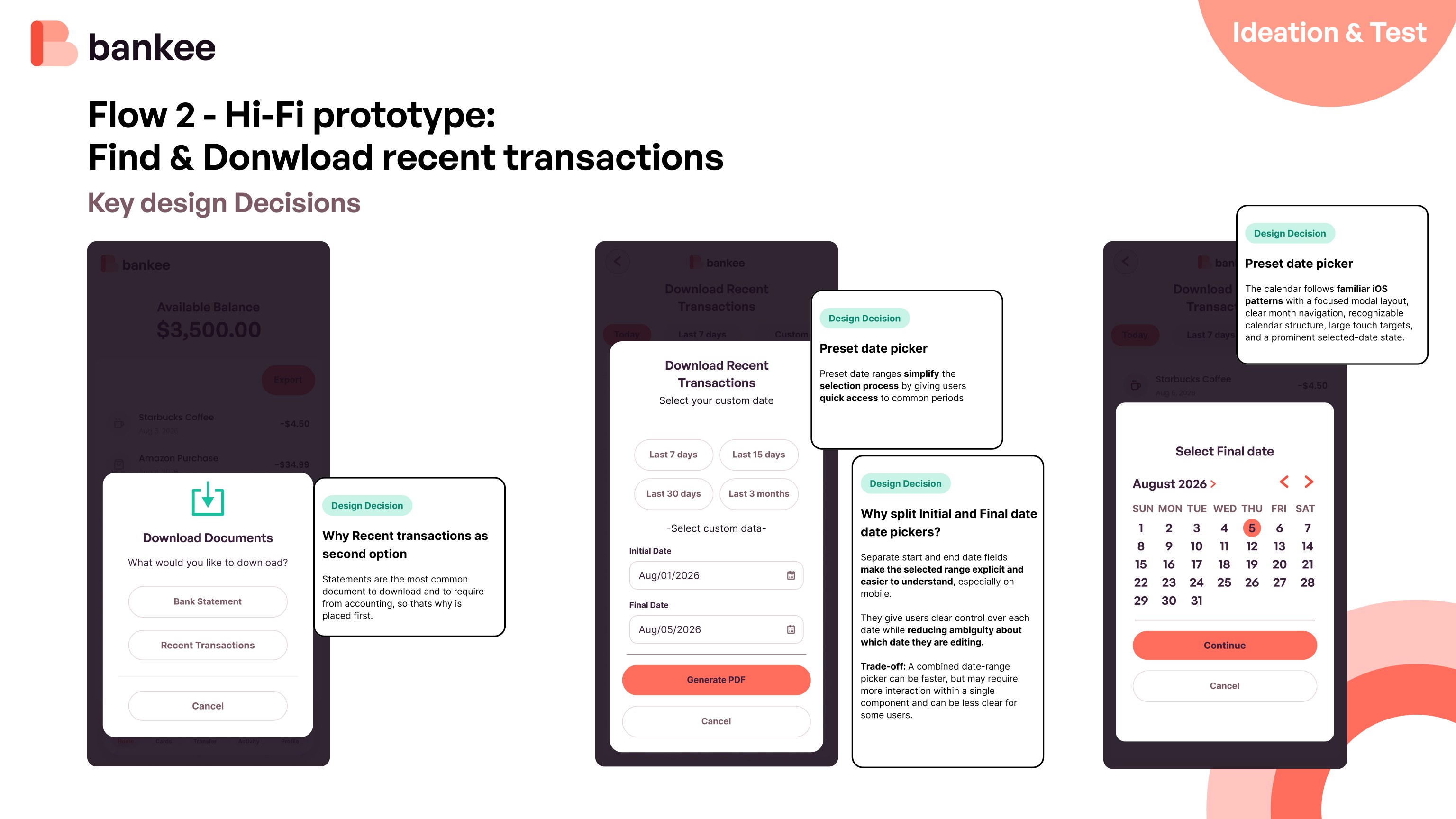
Download a custom date range
Presets for common periods, then separate start and end dates and an iOS calendar when the range is custom.
Recovery
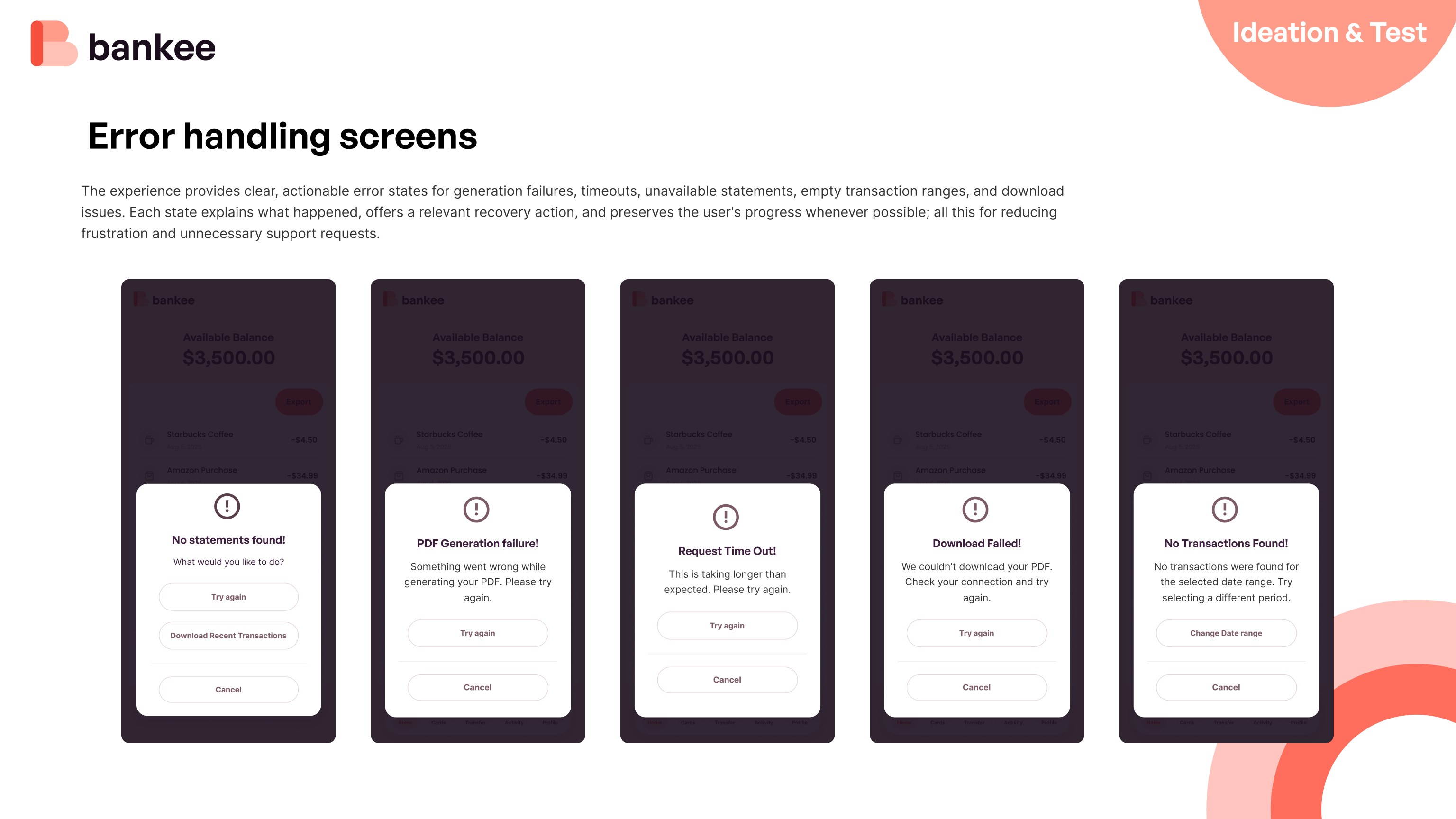
Errors you can recover from
No statements, PDF failure, timeout, download failed, empty range — each one explains what happened and offers retry or a new date.
Impact
Customer tickets
No support
Statement and history stay in the app — no call to support.
Monthly or custom history
5 steps
From Transactions to a PDF for the month or a date range.
STAR case
Get the PDF without leaving the app
Situation
People could not find a bank statement or a transaction history in Bankee. The download was buried, confusing, or sent them to the web — and support took the tickets.
Task
Design an in-app PDF download for a monthly statement and for a custom date range, in a five-day challenge, and prove it in a Maze test.
Action
Separated official statements from user-defined transaction exports. Benchmarked Chase, Bank of America, Capital One, Revolut, Wise, and Rappi. Mapped pain into an affinity diagram and an impact-versus-effort graph. Wired two flows, tested six people on Maze, then designed hi-fi with a spend preview, date presets, and errors you can recover from.
Result
Four of six participants finished both tasks. Download sits on Transactions. A modal splits the two documents. Failures say what happened and offer retry or a new date — instead of a spinner and a support ticket.